
Introduction:
Your product photos are your silent sales team. In a world where customers can't pick up, smell, or try on your products before buying, a crisp, well-edited image does all the convincing. For example, one Shopify seller swapped out unedited photos for professionally retouched images and saw their product's click-through rate jump by 35% in just two weeks.
A simple before-and-after showing a bag with a dull, cluttered background next to the same bag on a bright, clean white background illustrates just how much better professional edits can make your products look and how quickly they can impact your sales. But with dozens of photo editing services on the market, ranging from AI-powered tools to white-glove professional studios, how do you know which one is right for your store? This guide breaks down the best options across every budget and use case, so you can make an informed decision and start converting browsers into buyers.
Why Product Photo Editing Matters More Than You Think
Before diving into the services, it's worth understanding what's actually at stake. Studies consistently show that image quality is one of the top factors influencing online purchase decisions. Poor lighting, distracting backgrounds, or inconsistent image styles can make even premium products look cheap and send shoppers straight to a competitor.
The most common edits e-commerce sellers need include:
- Background removal: replacing cluttered or off-color backgrounds with clean white or transparent ones
- Color correction: ensuring product colors are true-to-life across different lighting conditions
- Shadow and reflection creation: adding natural-looking drop shadows or mirror effects for depth
- Retouching: removing dust, scratches, and imperfections from product surfaces
- Resizing and formatting: preparing images to exact specifications for Amazon, Shopify, Etsy, or other platforms
Now, let's look at who does it best.
The Best Photo Editing Services for E-Commerce
1. Precision for Complex Edges
Best for: Sellers who need quick, clean background removal at scale
Pricing: Starts at ~$7.99/month for 15 images
Clipping Magic uses AI to detect and remove backgrounds with impressive accuracy automatically. It's particularly strong with products that have defined edges, think electronics, footwear, or packaged goods. The interface is intuitive enough for non-designers, and a manual refinement brush lets you clean up tricky spots like hair or transparent materials.
Pros: Fast turnaround, easy to use, decent AI accuracy
Cons: Struggles with complex edges; not ideal for high-volume enterprise needs
2. Remove.bg Best Free or Low Cost Background Removal Tool
Best for: Beginners and small shops on a tight budget
Pricing: Free for low resolution; credits start at ~$0.20/image for HD
Remove.bg is arguably the most well-known AI background removal tool on the market. You upload an image, and within seconds, you get a clean cutout. Remove.bg integrates seamlessly with platforms like Shopify through an official app you can install from the Shopify App Store, allowing you to edit your product photos directly within your Shopify dashboard. For Photoshop users, Remove.bg offers a dedicated plugin that lets you remove backgrounds from images without ever leaving the Photoshop interface. For more advanced automation, the Remove.bg API also connects to other tools and systems, making it a practical option for automating workflows.
Pros: Free tier available, API integrations, extremely fast
Cons: Less precise than manual editing; struggles with fine details
3. Pixelz Best Professional Service for High-Volume Sellers
Best for: Mid-to-large e-commerce brands need consistent, professional results
Pricing: Subscription plans starting around $29/month; per-image pricing available
Pixelz connects you with a team of professional retouchers who follow your brand's style guide to deliver consistent, polished results across hundreds or thousands of images. Onboarding is straightforward: you'll start by submitting sample images along with your brand's style guide or editing preferences. Pixelz uses these to establish a standard workflow and can provide test edits for your approval before full production begins. It's trusted by some of the world's largest fashion and retail brands. Turnaround is typically within 24 hours, and their proprietary retouch engine blends automation with human quality control.
Pros: Consistent quality, handles complex edits, scalable for enterprise
Cons: Pricier than DIY tools; setup takes time to establish style preferences
4. Canva Pro-Best for All-in-One Editing and Design
Best for: Small business owners who need editing and marketing design in one place
Pricing: ~$15/month
Canva isn't just a photo editing tool; for e-commerce sellers who also create social media content, banners, and promotional graphics, it's a powerhouse. Canva Pro includes a background remover, image enhancer, and hundreds of product mockup templates. It won't replace a dedicated retouching service for heavy-duty work, but for many small sellers, it checks every box.
Pros: Incredibly versatile, easy to use, great templates
Cons: Not designed for high-end retouching; limited batch processing
5. Adobe Photoshop (with Generative Fill)- Best for In-House Creative Control
Best for: Brands with an in-house designer who want maximum control
Pricing: ~$22.99/month (Photography Plan includes Lightroom)
For teams with design expertise, Photoshop remains the gold standard. Adobe's recent AI-powered Generative Fill feature lets editors seamlessly extend backgrounds, remove objects, and even generate entirely new background environments for your products. Combined with Lightroom for batch color correction, it's an unmatched professional toolkit.
Pros: Unmatched flexibility and quality ceiling, industry-standard
Cons: Steep learning curve; requires a skilled editor to use effectively
6. Retouching Labs- Best Outsourced Service for Fashion and Apparel
Best for: Clothing, jewelry, and accessory brands that need ghost mannequin effects and fabric retouching
Pricing: Per-image pricing, typically $1–$5 depending on complexity
Retouching Labs specializes in fashion e-commerce editing. Their signature service is the "ghost mannequin" or "invisible mannequin" effect. This technique makes clothing appear to be worn by an invisible person, giving garments shape and dimension without the cost of a model. They also excel at jewelry retouching, which requires extreme precision.
Pros: Niche expertise in fashion, high quality, flexible pricing
Cons: Not the fastest turnaround; higher cost for complex edits
7. Fotor- Best Budget- Friendly All-Rounder
Best for: Solo sellers and small shops wanting solid quality without a big investment
Pricing: Free tier available; Pro plan ~$8.99/month
Fotor offers a web-based editing suite with AI-powered tools for background removal, retouching, color correction, and even AI-generated product mockup scenes. It strikes a solid balance between ease of use and output quality, and the price point makes it accessible for anyone just starting.
Pros: Affordable, beginner-friendly, good range of AI tools
Cons: Output quality doesn't match professional services for complex edits.

How to Choose the Right Service for Your Store
With so many options, the right choice comes down to a few key questions:
How many images do you process per month? For under 50 images/month, DIY tools like Remove.bg or Canva Pro are cost-effective. For 100–1,000+ images, professional services like Pixelz offer better consistency and ROI. To measure the return on investing in higher-quality images, track key metrics such as your product's conversion rate, average order value, and time saved on editing. Comparing these metrics before and after upgrading your photo editing process can help you clearly see the impact on your business.
What industry are you in? Fashion brands should prioritize services with ghost mannequin and fabric expertise. Electronics and hard goods sellers benefit most from precise background removal and shadow work.
Do you have in-house design talent? If yes, investing in Adobe Creative Cloud gives you the highest ceiling for quality. If no, outsourced services with human retouchers are the smarter bet.
Which direction to take? Here’s a quick decision checklist to help you choose between DIY tools and outsourcing:
- How comfortable are you (or your team) with photo editing software? If you’re not confident with advanced tools, DIY options might turn out to be time-consuming or yield lower-quality results.
- Is speed or scale your priority? DIY tools work for small batches or fast edits, while outsourcing is better for consistent results across large volumes.
- Do you need advanced edits (like ghost mannequins, intricate retouching, or style matching)? If yes, outsourcing is likely your best option.
Answer these, and you’ll quickly see which approach fits your workflow and business best.
What platforms are you selling on? Amazon requires pure white backgrounds (RGB 255, 255, 255). Shopify and Etsy allow more creative freedom. Make sure your chosen service can deliver images in your platform's required specifications.
The Bottom Line
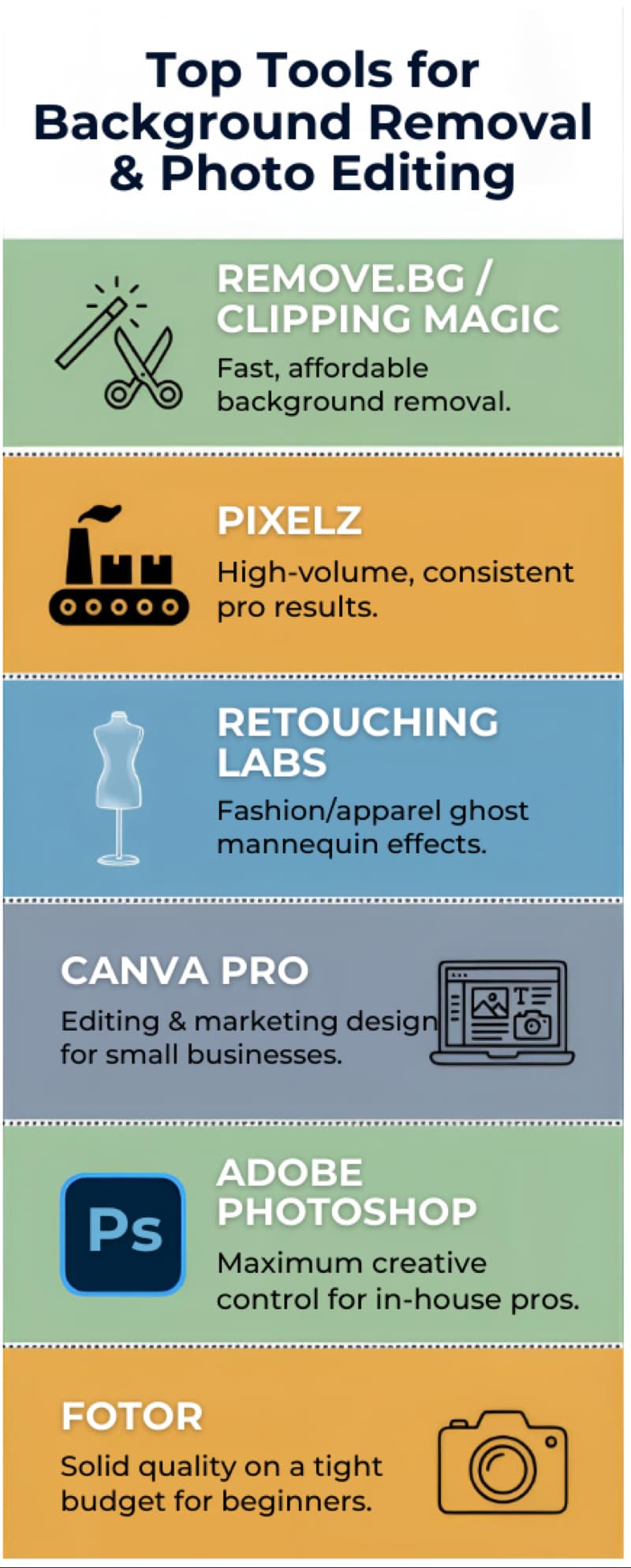
There's no single "best" photo editing service, only the best one for your business. Here's a quick cheat sheet:
 Invest in your product imagery, and your conversion rates will thank you. In e-commerce, a great photo isn't just aesthetics; it's revenue.
The right choice comes down to your volume, industry, budget, and whether you have in-house design talent. Here's a quick recap:
- Remove.bg or Clipping Magic if you need fast, affordable background removal
- Pixelz, if you're processing high volumes and need consistent, professional results
- Retouching Labs if you're in fashion or apparel and need ghost mannequin effects
- Canva Pro is for you if you're a small business owner who needs editing and marketing design in one place
- Adobe Photoshop, if you have an in-house designer and want maximum creative control
- Fotor, if you're just starting and need solid quality on a tight budget
In an online store, customers can't touch, try on, or inspect your products; your images do all the convincing. Investing in the right editing service doesn't just improve aesthetics; it directly impacts conversions, trust, and revenue.
Start with a free trial, when available, and test with a small batch of images to see how a tool performs for your specific needs. Keep in mind that many free trials have image limits or apply watermarks to your downloads, so check these details before committing. To avoid surprises down the line, try integrating the service with your existing asset management or publishing workflows during your trial upload and export images the same way you would for your store. Look for options such as integrations with your e-commerce platform, cloud storage, or automation tools, and ensure file formats and sizes work well with your process. The right tool is the one that fits seamlessly into your workflow and makes your products impossible to scroll past.
Have a favorite photo editing service that didn't make the list? The right tool is ultimately the one that fits your workflow, budget, and quality bar. Start with a free trial where available, test with a small batch of images, and scale from there.
