
When selling on Amazon, your product images are more than just visuals — they are a critical factor in visibility, credibility, and conversion. A clear and professional Amazon product image helps customers trust your product quickly. Amazon has strict Amazon product image guidelines that every seller must follow. These rules explain the correct background, format, and overall presentation. They also define the proper Amazon product image size and resolution. If you ignore these rules, your listing may be suppressed. But following rules alone is not enough to increase sales. Well-edited and optimized images attract more clicks and improve conversions. That’s why many sellers choose a professional Amazon product image editing service for better results.
Why are Amazon product image requirements important?
Well-taken photos are the first thing that a customer notices, so the best way to ensure that your store appears professional is to adhere to Amazon’s guidelines. By doing so, you will ensure that your product is highlighted, trust is built between you and the customer, and your store is not suppressed by Amazon.
-
Build trust with clear product images A clear, professional product image is exactly what our customers are getting. In addition, when customers can see the product clearly, they feel more confident about purchasing it. A confident customer means more clicks, higher engagement, and ultimately, more sales.
-
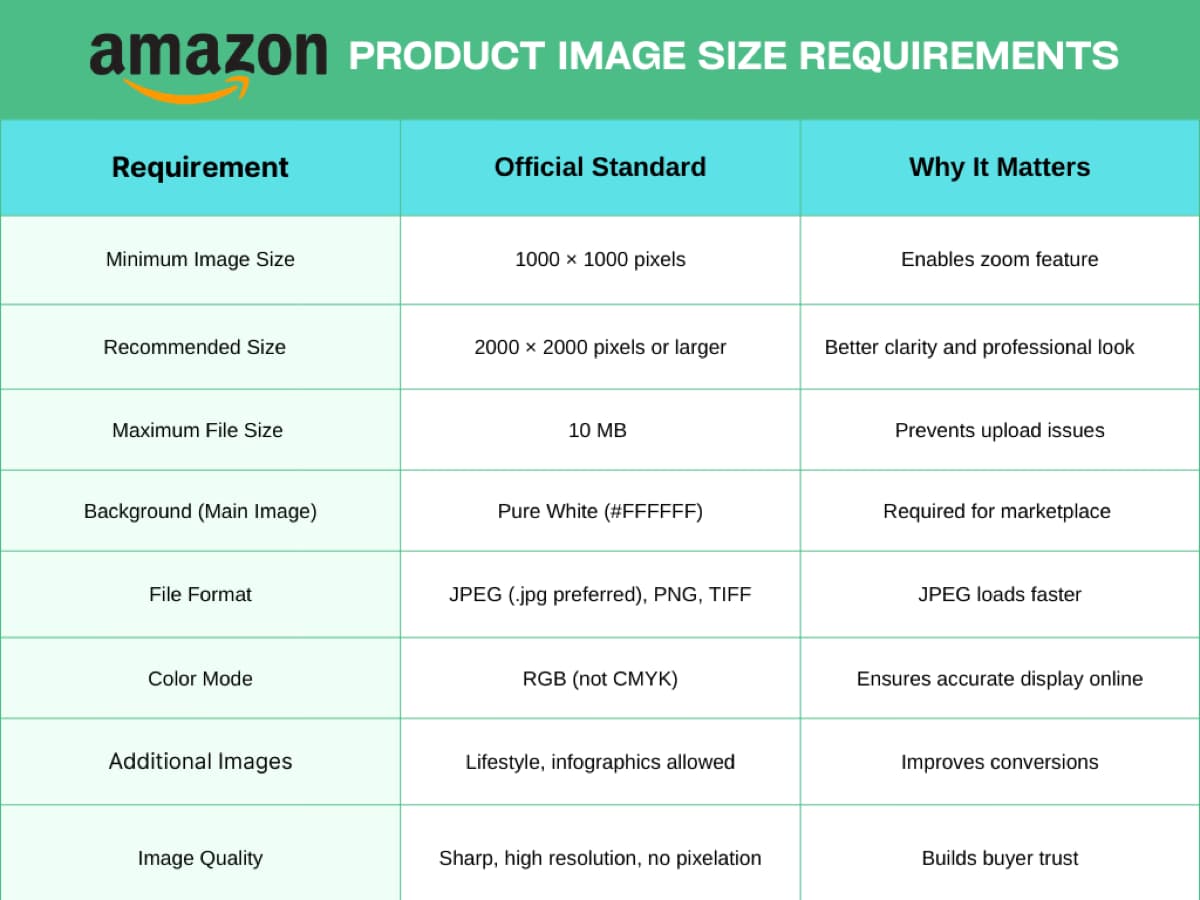
Use the right Amazon product image size Amazon requires images to meet specific product image size standards – at least 1000 pixels on the longest side. This ensures that the zoom feature works, giving shoppers a chance to examine the product details up close. On the other hand, when customers can zoom in, they’re less hesitant and more likely to make a purchase.
-
Increase Listing Visibility Amazon’s product image guidelines are more likely to rank higher in Amazon search results. In addition, optimized images rank differently in search results, which draws more attention and potential buyers to your listing.
-
Reduce Returns and Customer Complaints Clear, accurate Amazon product images set the right expectations for color, size, and detail. Furthermore, customers know exactly what to expect, and they are less likely to return products. Fewer returns also improve your seller’s reputation and build long-term trust.
-
Save Time with Professional Editing Professional image editing services can add value to professional products by performing background removal, resizing, color adjustment and overall optimization, not just to satisfy Amazon’s requirements, but to differentiate your product from its competition.
What are the best practices for Amazon Product Image Requirements?
High-quality product images are one of the biggest factors that influence buying decisions on Amazon. To create listings that attract clicks and drive sales, it’s essential to understand and follow Amazon’s image requirements carefully.
What Are Amazon Product Image Size Requirements?
After capturing the image, raw apparel photos often include wrinkles, uneven lighting, or visible mannequins that distract from the garment.
Using a ghost mannequin service, editors remove the mannequin and create a natural 3D shape. In addition, this ghost mannequin effect gives clothing a realistic, wearable appearance while keeping the focus entirely on the product.
How Many Images Should You Upload on Amazon?
Amazon image upload tips
Posting multiple images isn't just an Amazon policy; it’s also a great sales strategy. Amazon image guidelines
- Minimum: 1 image (main image is mandatory)
- Recommended: 7–9 images per product
Maximum: Up to 9 images on most product listings; some product categories may be allowed more images
Types of Images to Include
Main Product Photo
The main image is the first thing that customers will see, so it should be clear and professional. Use a front-facing photo with a pure white background that takes up most of the image so that the product is easily identifiable. In addition, make sure that the product is in sharp focus, well-lit, and centered, and that there are no props, text, logos, or watermarks.
Tips
- Use even lighting to prevent harsh shadows.
- Make sure the product is centered and takes up at least 85% of the image.
- Save at a high resolution (minimum 1000 pixels on the longest side) to allow for zooming.
Side and Back Views Side and back views provide a complete view of the product’s shape and structure. Take each side and back view separately and include any significant structural details such as seams, fasteners, ports, or mounting holes. These views should be similar in lighting and background to the main image.
Tips
- Take side and back views from a true side and rear angle, rather than highly distorted views.
- Use a tripod to maintain consistent framing in each photo.
- If the product has moving parts, take photos of the parts in a neutral, closed position and in an open/extended position if applicable.
Close-up Images Close-ups emphasize textures, materials, stitching, or special features that are important to consumers. Shoot close-ups to emphasize detail, such as fabric weave, button quality, engraving, or electronic ports. Every close-up should answer a question that a consumer might have about the product.
Tips
- Focus on one feature per image and include a short caption in the listing copy to explain what’s shown.
- Maintain consistent color accuracy so materials look true to life.
- Don’t over-edit—clarity and realism should come first.
Lifestyle Images
Lifestyle photos feature the product in real-life settings to help the customer visualize using it.
Use the product in a real-life setting, size it proportionately in a room or on a model, and show how it can be used in everyday life.

Tips
- Use natural, relatable settings and real people when appropriate.
- Show the product solving a problem or enhancing an experience.
- Keep the focus on the product—backgrounds should support, not distract.
Maintain Professional Composition
A professional-looking product photo on Amazon is clean, clear, and trustworthy, and you can achieve this by paying attention to a few key things.
- Use soft, even lighting so the colors and details are accurate.
- Focus sharply on the product.
- Always use a pure white background for the main image. Neutral backgrounds can be used for the other images.
- Maintain consistency in angle, style, and lighting across all images.
- Position the product so it takes up most of the image (about 85%) and center it.
How Should You Use Infographics in Amazon Listings?
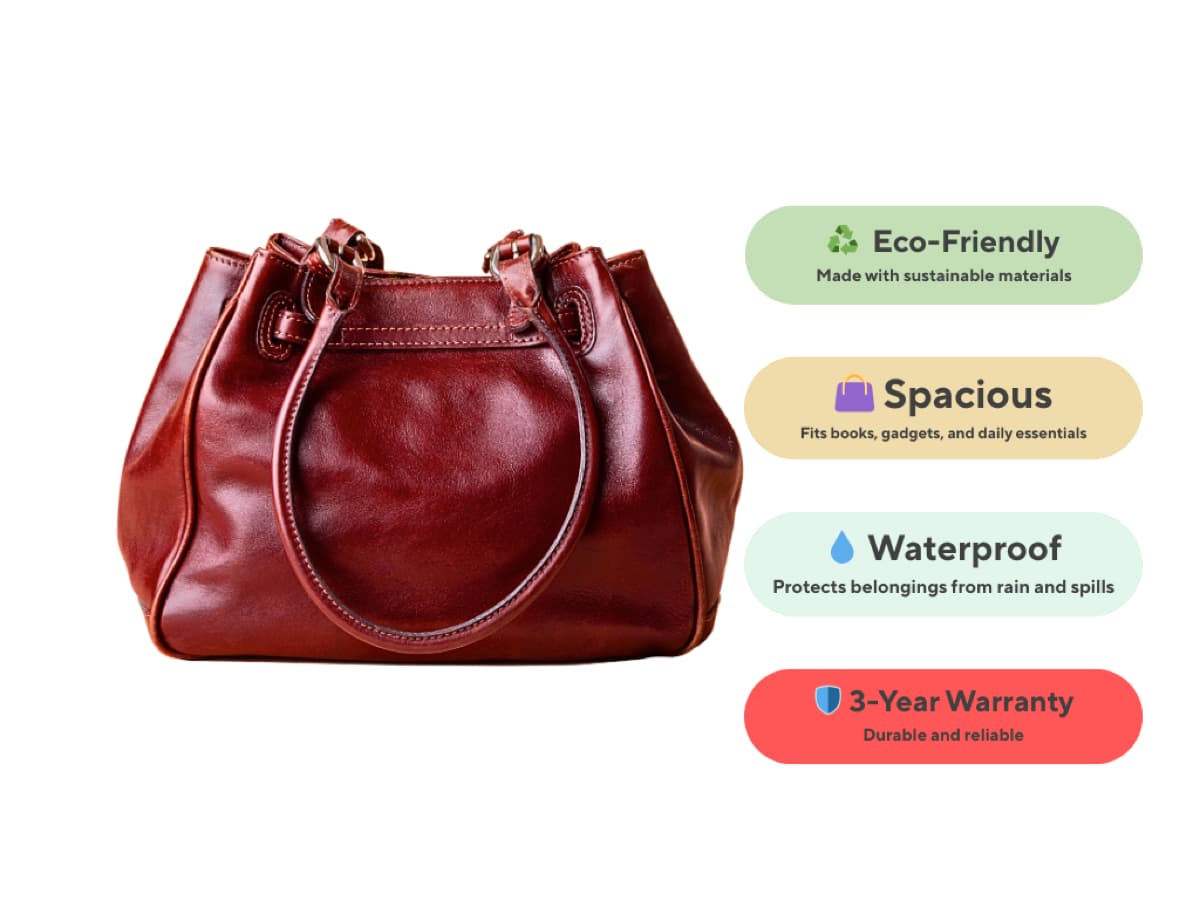
Infographics are an excellent way to communicate product information effectively and quickly.
On Amazon, customers tend to browse through product listings quickly, so using effective graphics can help draw attention to important product features, specifications, and benefits without the need for lengthy text descriptions.
Best Practices for Creating Infographics:
- Key Features: Use icons and short labels to point out key product features such as Waterproof, Eco Friendly, or 3-Year Warranty. Choose simple and recognizable icons and position them close to the relevant area of the product so that customers can easily notice the important features.
- Measurements and Dimensions: Using graphics to represent size or scale can ensure that customers have an accurate understanding of the product.
- Show Usage or Functionality: Demonstrate how the product works or what’s included in the package. Step-by-step graphics or simplified diagrams are highly effective.
- Keep it Simple and Readable: Don’t make it cluttered or have complicated sentences. Make use of bold text, contrasting colors, and simple icons to make sure the message gets across at first glance.
- Maintain Brand Consistency: Use your brand colors, fonts, and style to make infographics look professional and consistent with the rest of your images.
Think About a Global Audience & Test Your Images
When you are designing product images for Amazon, keep in mind that the target audience is worldwide. Every design image should be universally understood and provide measurements to avoid confusion. In addition, do not include elements that are specific to certain cultures and may not be understood by international customers. Moreover, after launching your product images, do not forget to test and optimize them regularly. Try to keep track of your conversion rates and optimize images that have low performance.
Conclusion
When creating your product images, always think from your customers’ perspective. Why should they choose your product over others? In addition, show them the best angles, clear details, useful information, and smart infographic images. When you present everything clearly, you don’t just show a product — you answer their questions and build confidence. Those photo combinations work together to tell your brand’s story on Amazon. Remember, a global audience will see your listing. So plan carefully, present professionally, and make every image count.
